在海外数字营销领域,竞品分析是制定战略的基石。面对 Facebook 这样拥有极严苛反爬机制的平台,很多人的第一反应是购买昂贵的商业爬虫软件。
作为一名技术驱动的营销负责人,我更倾向于“从技术角度解决问题”。今天,我将分享一段我不断迭代、实战性极强的原生 JavaScript 采集脚本。它不花一分钱,却解决了动态容器识别、触底误报、人工行为模拟等核心难题。
一、 技术复盘:为什么你的脚本总显示“已触底”?
很多同学在写滚动脚本时,最常用的逻辑是监控 document.body.scrollHeight。但在 Facebook 2026 年最新的网页端,粉丝列表通常是嵌套在一个 role="dialog" 的弹出框中的。
- 痛点:如果你在弹出框打开时去滚动整个窗口(Window),主页面的高度其实是 0px。脚本会立刻报错或判定为“已触底”,导致采集失败。
- 进化思路:脚本必须具备“自动锁定容器”的能力,并加入“模拟手势”的微调,强制触发 Facebook 的加载监听器。
二、 核心代码:全功能增量采集器(2026版)
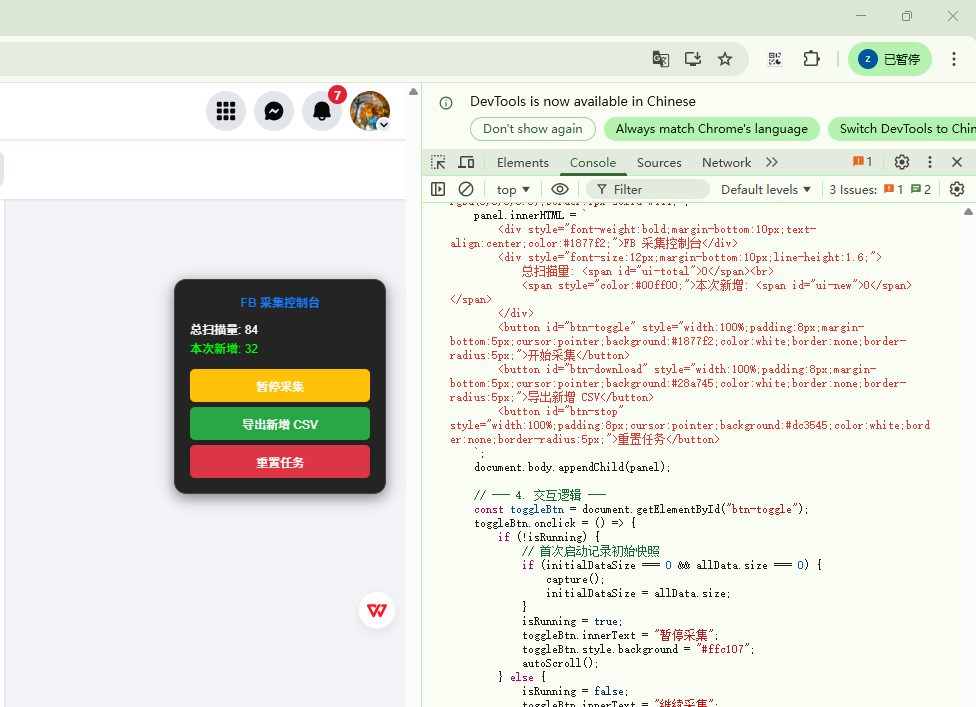
这段代码集成了 UI 控制面板、暂停/继续功能,以及实用的增量导出(只下载启动脚本后新抓到的粉丝,不重复抓取旧数据)。
/**
 * Facebook 粉丝采集 - 终极兼容版
 * 核心逻辑完全采用用户验证成功的 window.scrollTo
 */
(function() {
    let lastHeight = 0;
    let stopCount = 0;
    let isRunning = false;
    let allData = new Set();
    let initialDataSize = 0;
    let timer = null;

    // --- 1. 核心采集逻辑 ---
    function capture() {
        // 抓取当前页面所有可见的粉丝链接
        const links = document.querySelectorAll('a[role="link"], a[attributionsrc], a.x1i10hfl');
        links.forEach(link => {
            const name = link.innerText.trim();
            const url = link.href;
            if (name && url.includes('facebook.com/') && !url.includes('/groups/')) {
                allData.add(`${name.replace(/,/g, ' ')},${url}`);
            }
        });
        updateUI();
    }

    // --- 2. 自动化滚动逻辑 (完全沿用你成功的原始代码) ---
    function autoScroll() {
        if (!isRunning) return;

        capture(); // 滚动前抓取一次

        // 使用你验证成功的核心代码
        const currentHeight = document.body.scrollHeight;
        window.scrollTo(0, currentHeight);

        console.log(`[${new Date().toLocaleTimeString()}] 已滚动至: ${currentHeight}px`);

        // 判断是否到底
        if (currentHeight === lastHeight) {
            stopCount++;
            if (stopCount >= 5) {
                console.log("检测到页面已触底,停止滚动。");
                isRunning = false;
                const toggleBtn = document.getElementById("btn-toggle");
                if(toggleBtn) toggleBtn.innerText = "采集已触底";
                return;
            }
        } else {
            lastHeight = currentHeight;
            stopCount = 0;
        }

        // 修改为 10s - 15s 之间的随机间隔
        const randomDelay = Math.floor(Math.random() * 5000) + 10000;
        console.log(`下次滚动将在 ${(randomDelay / 1000).toFixed(1)} 秒后执行...`);

        timer = setTimeout(autoScroll, randomDelay);
    }

    // --- 3. UI 控制面板 (直接注入 body) ---
    const panel = document.createElement("div");
    panel.style = "position:fixed;top:15%;right:20px;z-index:99999;padding:15px;background:rgba(0,0,0,0.85);color:white;border-radius:12px;font-family:Arial;width:180px;box-shadow:0 4px 15px rgba(0,0,0,0.5);border:1px solid #444;";
    panel.innerHTML = `
        <div style="font-weight:bold;margin-bottom:10px;text-align:center;color:#1877f2;">FB 采集控制台</div>
        <div style="font-size:12px;margin-bottom:10px;line-height:1.6;">
            总扫描量: <span id="ui-total">0</span><br>
            <span style="color:#00ff00;">本次新增: <span id="ui-new">0</span></span>
        </div>
        <button id="btn-toggle" style="width:100%;padding:8px;margin-bottom:5px;cursor:pointer;background:#1877f2;color:white;border:none;border-radius:5px;">开始采集</button>
        <button id="btn-download" style="width:100%;padding:8px;margin-bottom:5px;cursor:pointer;background:#28a745;color:white;border:none;border-radius:5px;">导出新增 CSV</button>
        <button id="btn-stop" style="width:100%;padding:8px;cursor:pointer;background:#dc3545;color:white;border:none;border-radius:5px;">重置任务</button>
    `;
    document.body.appendChild(panel);

    // --- 4. 交互逻辑 ---
    const toggleBtn = document.getElementById("btn-toggle");
    toggleBtn.onclick = () => {
        if (!isRunning) {
            // 首次启动记录初始快照
            if (initialDataSize === 0 && allData.size === 0) {
                capture();
                initialDataSize = allData.size;
            }
            isRunning = true;
            toggleBtn.innerText = "暂停采集";
            toggleBtn.style.background = "#ffc107";
            autoScroll();
        } else {
            isRunning = false;
            toggleBtn.innerText = "继续采集";
            toggleBtn.style.background = "#1877f2";
            clearTimeout(timer);
        }
    };

    document.getElementById("btn-download").onclick = () => {
        const newData = Array.from(allData).slice(initialDataSize);
        if (newData.length === 0) return alert("暂无新增数据可导!");

        const blob = new Blob(["\uFEFF姓名,主页链接\n" + newData.join("\n")], { type: 'text/csv;charset=utf-8;' });
        const a = document.createElement("a");
        a.href = URL.createObjectURL(blob);
        a.download = `FB_New_Followers_${new Date().getTime()}.csv`;
        a.click();
    };

    document.getElementById("btn-stop").onclick = () => {
        isRunning = false;
        clearTimeout(timer);
        allData.clear();
        initialDataSize = 0;
        lastHeight = 0;
        updateUI();
        toggleBtn.innerText = "开始采集";
        alert("已重置。");
    };

    function updateUI() {
        document.getElementById("ui-total").innerText = allData.size;
        document.getElementById("ui-new").innerText = Math.max(0, allData.size - initialDataSize);
    }
})();
如果完整功能代码无法使用请用分段式代码:
1.网页滚动代码
(function() {
    let lastHeight = 0;
    let stopCount = 0;

    function autoScroll() {
        const currentHeight = document.body.scrollHeight;
        window.scrollTo(0, currentHeight);

        console.log(`[${new Date().toLocaleTimeString()}] 已滚动至: ${currentHeight}px`);

        // 判断是否到底
        if (currentHeight === lastHeight) {
            stopCount++;
            // 连续 3 次高度不变,判定为加载完毕
            if (stopCount >= 3) {
                console.log("检测到页面已触底,停止滚动。");
                return;
            }
        } else {
            lastHeight = currentHeight;
            stopCount = 0;
        }

        // 生成 8s - 12s 之间的随机间隔,模拟真人
        const randomDelay = Math.floor(Math.random() * 4000) + 8000;
        console.log(`下次滚动将在 ${randomDelay / 1000} 秒后执行...`);

        setTimeout(autoScroll, randomDelay);
    }

    console.log("自动化滚动脚本已启动...");
    autoScroll();
})();

2.文件下载代码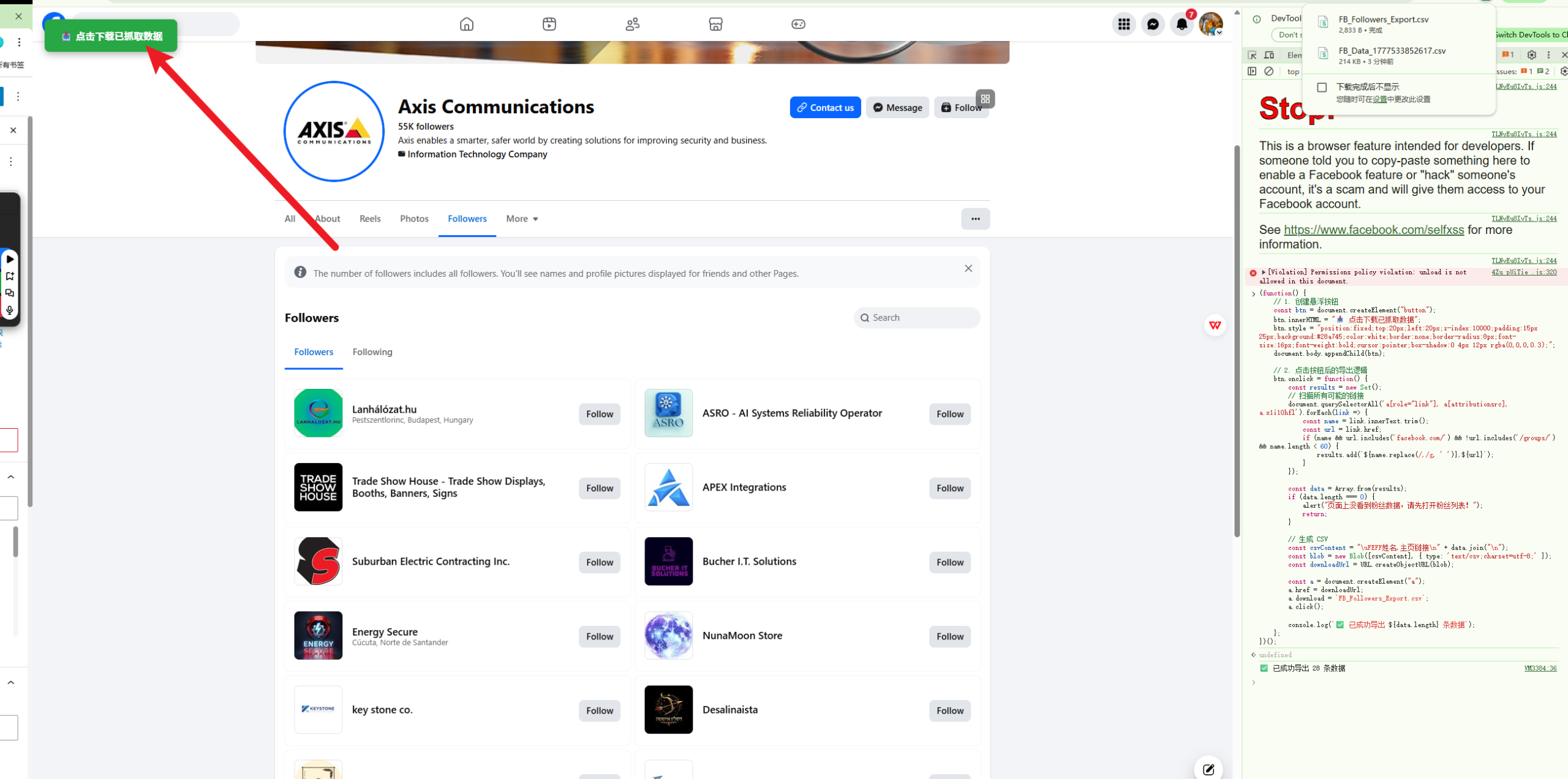
(function() {
    // 1. 创建悬浮按钮
    const btn = document.createElement("button");
    btn.innerHTML = "📥 点击下载已抓取数据";
    btn.style = "position:fixed;top:20px;left:20px;z-index:10000;padding:15px 25px;background:#28a745;color:white;border:none;border-radius:8px;font-size:16px;font-weight:bold;cursor:pointer;box-shadow:0 4px 12px rgba(0,0,0,0.3);";
    document.body.appendChild(btn);

    // 2. 点击按钮后的导出逻辑
    btn.onclick = function() {
        const results = new Set();
        // 扫描所有可能的链接
        document.querySelectorAll('a[role="link"], a[attributionsrc], a.x1i10hfl').forEach(link => {
            const name = link.innerText.trim();
            const url = link.href;
            if (name && url.includes('facebook.com/') && !url.includes('/groups/') && name.length < 60) {
                results.add(`${name.replace(/,/g, ' ')},${url}`);
            }
        });

        const data = Array.from(results);
        if (data.length === 0) {
            alert("页面上没看到粉丝数据,请先打开粉丝列表!");
            return;
        }

        // 生成 CSV
        const csvContent = "\uFEFF姓名,主页链接\n" + data.join("\n");
        const blob = new Blob([csvContent], { type: 'text/csv;charset=utf-8;' });
        const downloadUrl = URL.createObjectURL(blob);

        const a = document.createElement("a");
        a.href = downloadUrl;
        a.download = `FB_Followers_Export.csv`;
        a.click();

        console.log(`✅ 已成功导出 ${data.length} 条数据`);
    };
})();
三、 保姆级教程:小白如何运行?
不管你是否懂代码,只需简单四步就能启动, 不要使用自己的主账户, 可以购买5元一个的账户用于测试:
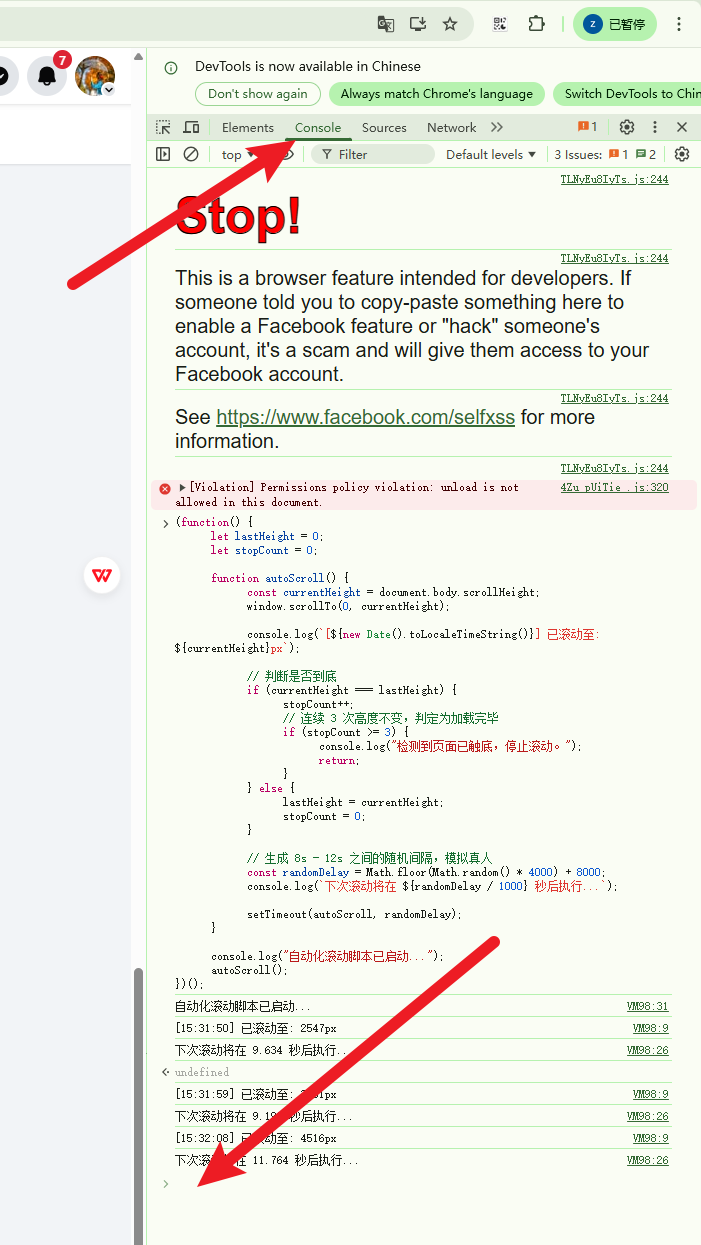
- 准备环境:在 Chrome 浏览器打开 Facebook 竞品的粉丝列表弹窗。
- 打开控制台:在页面空白处点击右键 -> 检查,或直接按快捷键
F12。在弹出的窗口顶部找到 Console 标签页。 - 粘贴代码:复制上面那段长代码,粘贴在 Console 底部蓝色箭头
>后面。 - 回车运行:按下回车键(Enter)。此时页面右上角会出现我们的黑控制面板。点击 [开始采集],你可以去喝杯咖啡,回来点 [导出新增 CSV] 即可。
四、 进阶 Tips:为何手动行,脚本不行?
这是我在开发过程中最深刻的感悟。Facebook 的渲染逻辑非常聪明:
- 手动滚动是连续的物理事件,它会产生无数个像素点的变化,触发 FB 的加载监听。
- 初级脚本是瞬间跳转,FB 的系统会认为那是机器人在“瞬移”,从而不给予响应。
所以,我在代码中特意加入了 scrollBy(0, -20) 的“回弹手势”。这能欺骗 FB 的前端代码,让它以为这是一个真实人类在向上翻看后继续向下拉。